
Track every lien.
Trust every calculation.
Close with confidence.
From verifying balances to generating the final statement—SettleSheet handles multi-tranche fees, Medicare reductions, and pro-rata caps while showing you exactly how it got there.
You know this workflow
Chasing providers. Triple-checking formulas. Praying nothing changed.
Every settlement starts the same way: call the provider, request the balance, wait on hold, get transferred, leave a voicemail. Repeat for every lien on the case.
Then the balance changes. Medicare issues a new conditional payment letter. The Medicaid ledger includes charges from before the accident—now you're manually crossing out line items and requesting a corrected version. The hospital adds late charges. The number you confirmed last week is wrong this week.
You're back on the phone. You're back in Excel, updating cell references, hoping you didn't break the fee calculation formula when you added that new lien.
The verification takes days. The calculation takes longer than it should. And you still don't fully trust the numbers until you've checked them yourself.

The Solution
One system for the entire settlement workflow.
SettleSheet replaces your settlement spreadsheet with a complete workflow: track every balance change, calculate complex fee structures transparently, catch inconsistencies before they become problems, and generate audit-ready statements.
- Balance tracking with change alerts.
- Record verified balances with contact info (who handles reductions at this provider? their direct line?). When a lien amount changes by more than $500 or 10%, you'll know immediately. No more surprises at closing.
- Inconsistency flagging.
- CMS says $12,000. The provider portal shows $11,500. The letter says $12,250. SettleSheet flags discrepancies automatically so you resolve them before the attorney asks.
- Catch unconfirmed liens.
- Generate final statement with unconfirmed Medicare demand? System blocks you with a warning. No more closing errors.
- Forensic audit trail.
- Every change is logged with a mandatory "Reason." If a client disputes the math three months later, you have a timestamped history of exactly who changed the lien amount and why.
- Show Your Work mode.
- See every calculation step, grade-school style. Fee on this tranche? Here's the math. Medicare reduction? Line by line. Trust the numbers because you can see them.
- Conservation of value guaranteed.
- Every calculation automatically verifies: Gross = Fee + Costs + Liens + Holdback + Client Net. If it doesn't balance, you can't generate the PDF.
- Multi-tranche fee calculation.
- Liability at 33.33%. MedPay exempt. UIM at reduced 25%. The system handles it automatically with proper fee breakdown.
- Medicare reduction calculator.
- Built-in 42 CFR § 411.37 procurement cost reduction. No more manual spreadsheet formulas for federal lien math.
- Referral fee automation.
- Handle complex co-counsel splits automatically. The system treats referral fees as a distribution of the attorney fee, not a generic "cost," keeping your logic clean.
- Provider contact directory.
- Never lose the reduction specialist's direct line again. Firm-wide directory of provider contacts, so when a colleague has already negotiated with St. Mary's, you start with their best contact—not the general billing line.
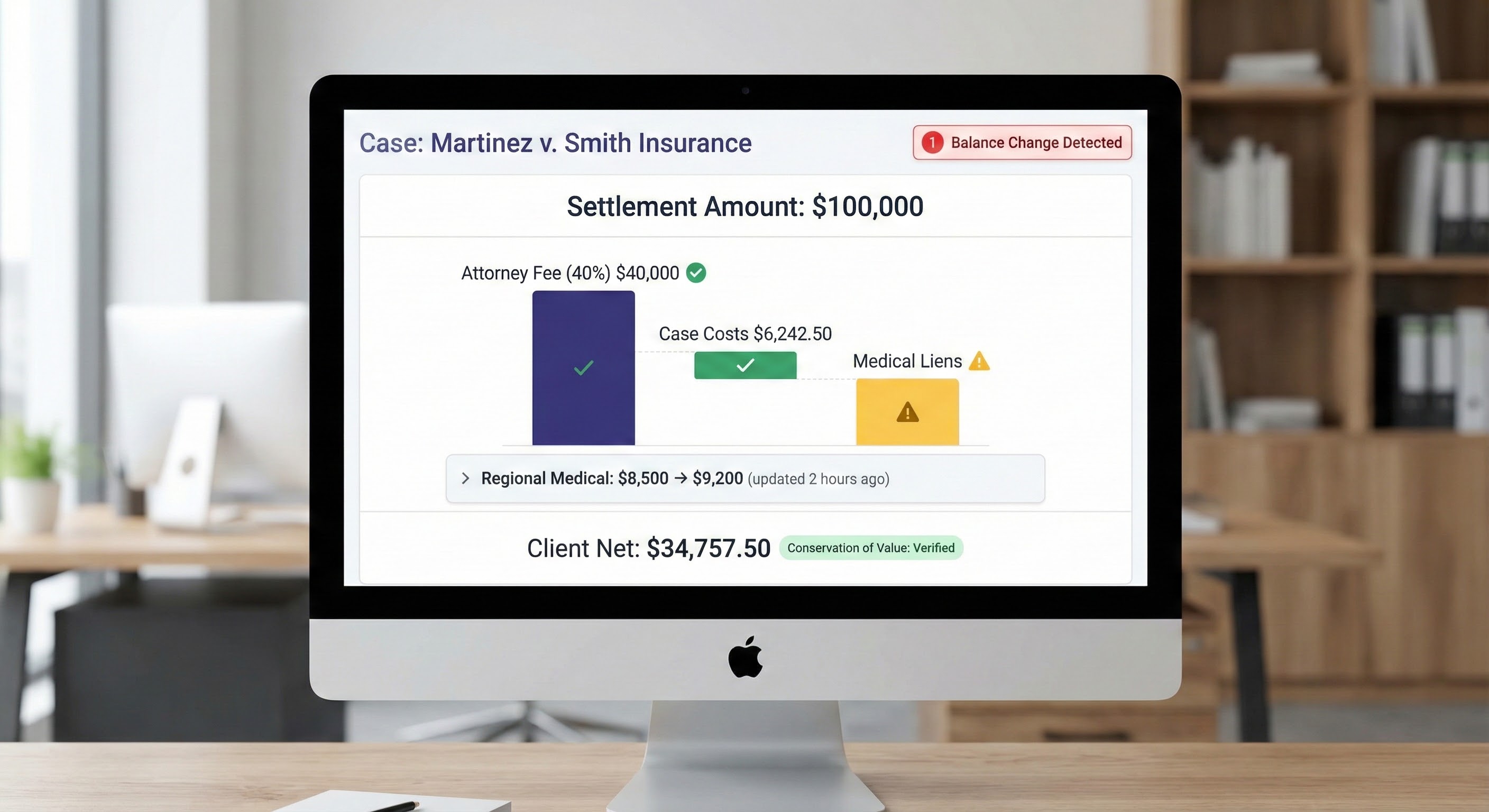
Balance changes are flagged immediately with full history

Track verification status across all your cases
How It Works
From gross recovery to client net in minutes
-
1Enter your settlement amounts
- Liability policy $75k. MedPay $5k. UIM $25k. Mark each tranche with its fee treatment: Standard, Reduced, or Exempt.
-
2Configure your fee structure
- Flat 33.33% or sliding scale tiered fees. Calculate on gross or net-of-costs. System handles both CA MICRA-style and standard contingency.
-
3Track costs and negotiate liens
- Enter hard and soft costs. Record verified lien balances with real-time savings display as you negotiate. Log who you spoke to at each provider, their direct line, what they offered—every change tracked with timestamps and reasons. Set your priority order. Apply common fund reductions where applicable.
-
4Generate settlement statement
- One-click PDF with full breakdown, lien negotiation savings, and signature lines. Professional presentation that makes you look like a hero to your attorney and your client.

"I trust my own VLOOKUPs more than I trust generic CMS calculators. But I absolutely hate spending time on tedious data verification that software should handle automatically. For me to ever build 100% trust, the tool must provide an uneditable, step-by-step log of how it arrived at the final number."
Built-in Safety Rails
Catch the violation before it becomes a bar complaint.
Minor settlements, fee caps, and unconfirmed liens aren't just warnings — they're professional liability traps. SettleSheet surfaces them before you generate the final statement.

Frequently asked questions
-
Does this replace Clio or MyCase?
-
No. SettleSheet works alongside your existing case management system. Clio and MyCase are built for time-and-billing (hours × rate). PI firms need ledger architecture (Recovery - Liens = Net). We handle settlement calculations; they handle case management.
-
Does SettleSheet enforce state-specific lien rules?
-
You set the priority order based on your jurisdiction. State lien rules vary significantly across 50 states (plus county-level variations in Florida), and you know your local rules better than any software. SettleSheet gives you full control to configure calculations exactly as your jurisdiction requires, with complete audit trail. State-specific presets are on the roadmap.
-
What about sliding scale fee structures?
-
Fully supported. Configure tiered fees (NY/CA medical malpractice style): first $250k at 30%, next $250k at 25%, etc. System handles both flat percentage and multi-tier sliding scales, calculated on either gross or net-of-costs.
-
How does the audit trail work?
-
We maintain a complete revision history. Every time a number changes, the system logs who made the change, when, and—most importantly—requires them to note why. If a client disputes the math three months after closing, you have a timestamped history of exactly who changed the lien amount and why.
-
How much does it cost?
-
Early access is free while we build with our first customers. Launch pricing: $149/month (Solo), $349/month (Small Firm), $749/month (Firm). No implementation fees. No consultants. One prevented trust accounting violation pays for a decade of subscriptions.
-
How does this improve firm cash flow?
-
Cases stuck in "settlement limbo" waiting for balance verification tie up firm capital and delay fee recovery. When you can track verification status across all cases and catch discrepancies early, settlements close faster. Faster closings mean better firm liquidity.
-
Is emailing settlement spreadsheets a compliance risk?
-
Yes. ABA Formal Opinion 477R requires "reasonable efforts" to protect client data when transmitting electronically. Excel files emailed to providers often contain client SSNs, medical diagnoses, and financial settlement details. SettleSheet uses secure share links with expiration and access logging instead of unencrypted email attachments.

Ready to retire the settlement spreadsheet?
We're onboarding a small group of Personal Injury paralegals and attorneys for early access. You'll shape the product. We'll solve your actual problems.
No credit card required. Limited spots available.